
Foundation
Building Automated Dashboards with AI
Overview
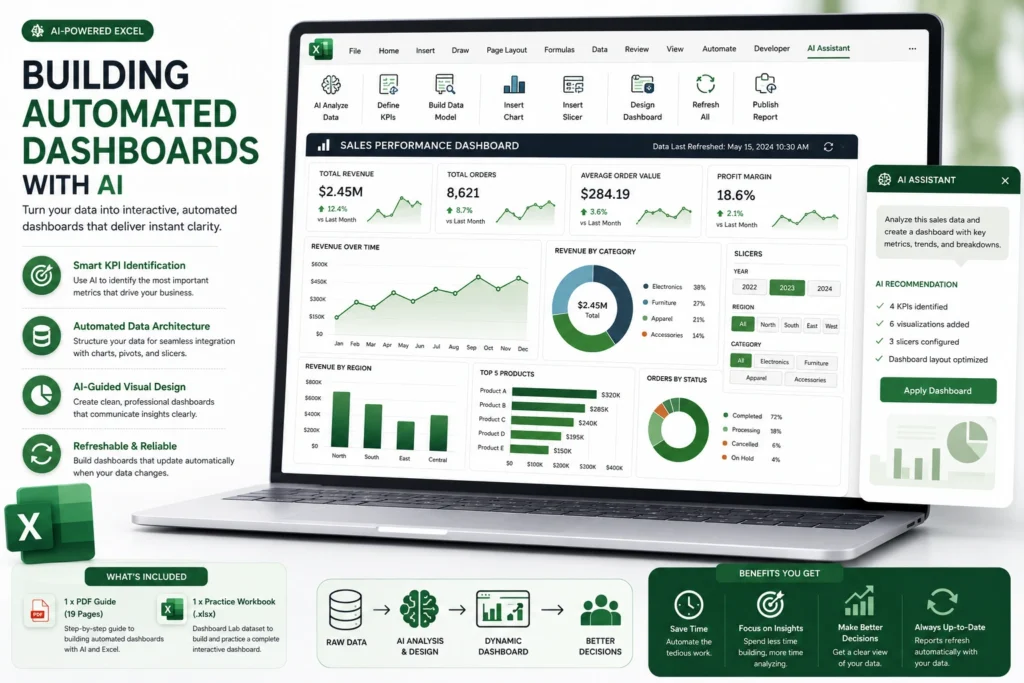
What You Will Learn
KPI Definition
Learn how to prompt AI to identify the most critical metrics within your dataset for high-impact reporting.
Automated Data Architecture
Master the art of using AI to structure raw data so it feeds seamlessly into your charts and slicers.
Visual Design Principles
Use AI-guided layouts to ensure your dashboard is intuitive, clean, and professional.
Refreshable Automation
Discover how to build "living" reports that update automatically when your source data changes, eliminating the need for manual rebuilding.
What’s Included
1 x Comprehensive PDF Guide (19 Pages)
A tactical guide covering the entire dashboard-building lifecycle—from data prep to final visual polish.
1 x Excel Practice Workbook (.xlsx)
A "Dashboard Lab" dataset, providing a realistic scenario to build a functional, interactive sales or operations dashboard from scratch.
System Requirements
Software
Microsoft Excel (Desktop Version). Compatible with Excel 2016, 2019, 2021, and Microsoft 365.
Skill Level
Intermediate. Basic familiarity with Charts and Pivot Tables is recommended.
Delivery & Support
Instant Access
Your files will be delivered via email to your registered address immediately after your purchase is confirmed.
Support
Need help perfecting your dashboard layout or troubleshooting a connection? Our team is available at support@autoexcel.pro .
Refund Policy
Please review our Refund and Return Policy for details regarding digital product access.